Marketing & Creative Agencies
See which services and projects earn their share. Bring staff costs, contractor expenses and client payments into one financial picture.
Management Accounting for Service Businesses
Management accounting, financial analysis and practical insights in one connected Google Sheets system.
One-time purchase · Taxes included · One activation code for one company
Profit centres across your business.
Revenue, costs and profit by service.
Goods sales and materials consumed.
Long-term contracts combining goods, services and business directions.
Accuroo Smart Finance brings your team costs, services, projects and financial reports together. Understand what drives profit, keep track of money owed and plan upcoming payments.
See which services and projects earn their share. Bring staff costs, contractor expenses and client payments into one financial picture.
Connect your team’s work with project revenue and costs. Track development, ongoing support and international transactions in one place.
Understand the economics of your expertise. Monitor service profitability, team costs and outstanding client balances across one-off projects and ongoing engagements.
Keep visibility over your largest expense: your people. Compare revenue with workforce costs and plan cash for payroll and other commitments.
Follow the financial performance of each project. Bring together revenue, staff costs, subcontractors and materials to understand your margins.
Understand the financial performance of your teaching services. Track instructor costs, advance payments and revenue recognised over the delivery period.
Manage the finances behind your service work. Track labour, materials, stock and equipment alongside customer and supplier balances.
See the financial result behind each production. Track project revenue, team and contractor costs, equipment and cash movements.
16 connected capabilities for the way your service business works.
Manage related entities as one business. Internal payments cancel out, so reports reflect the real economic activity.
Set accounting rules and tax options to match the way your service business operates. Follow the detailed guide included in the programme.
Work in up to 10 currencies. Maintain FX rates, revalue balances and calculate currency gains and losses.
Track purchases, sales and material consumption at average cost. Record stock counts and inventory adjustments.
Track expenses by business direction, service and project. Allocate shared costs to see what each activity really costs.
Record asset purchases and disposals. Calculate depreciation and track remaining book value. Track long-term capital projects by accumulating the costs of creating an asset.
Spread subscription and prepaid service revenue over the delivery period. Track what remains to be earned.
Record attendance, leave and service activity. Connect employee time to services and projects.
Auto-fill employee data and calculate salaries, piecework pay, commissions and accruals. Track payments and balances due.
Track balances with customers, suppliers and employees. Reconcile accruals and payments, with the transactions behind every balance.
Configure tax calculations and reconcile them with statutory accounting records. Reflect adjustments in your management reports.
Cash Flow, Profit & Loss and Balance Sheet, connected to the same records. See cash, profit and financial position together.
Compare workload, capacity and payroll costs. Measure revenue per productive hour and revenue relative to employer cost.
Track available cash and upcoming payments. Forecast balances and spot funding gaps before they affect your plans.
Start with your key business questions. The navigator leads you to clear answers about profit, cash, obligations and performance.
Add a compatible AI chat to Google Sheets for financial questions. Optional third-party service with separate terms and charges.
Smart Finance automatically flags accounting issues and areas of concern in your business. Clear written messages explain what needs attention and why.
Sales are only part of the story. Understand what you earn, where the money goes and what needs your attention.
See revenue, profit, cash and changes over time in one clear overview.
Understand available cash, outstanding customer balances and the obligations your business needs to meet.
Compare services, projects and business directions, including their share of common costs.
Explore margins, team capacity, payroll costs and returns to understand what is driving performance.
Review available cash, future payments and forecast needs before deciding on owner withdrawals.
*Employee capacity depends on employment duration and payroll assignments. People joining or leaving during the year need records for their active months. There is no separate limit on one-off counterparties without balance tracking; all their payments count toward the 2,500 monthly payment limit, and other transaction limits still apply. Inventory items include goods for sale and materials used to deliver services. These figures describe business records, not simultaneous users.
Explore the input areas, controls and reports that connect your day-to-day activity to financial decisions.
| Sheet / section | What it helps you do |
|---|---|
Setup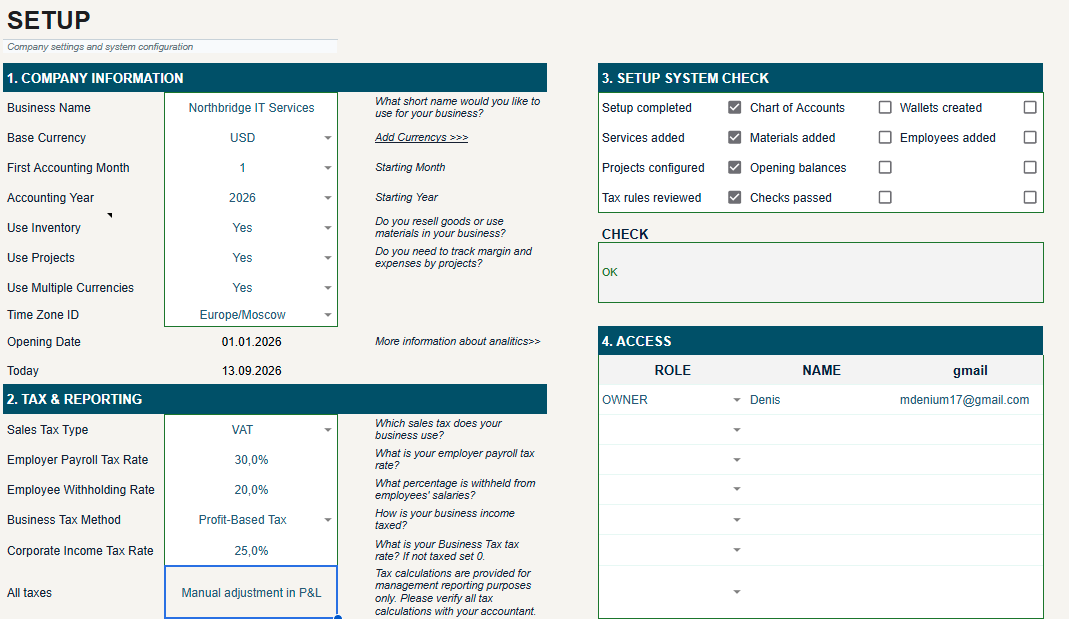 View full size View full size | Built around your business. Choose your reporting year, base currency and operating options in one place. |
List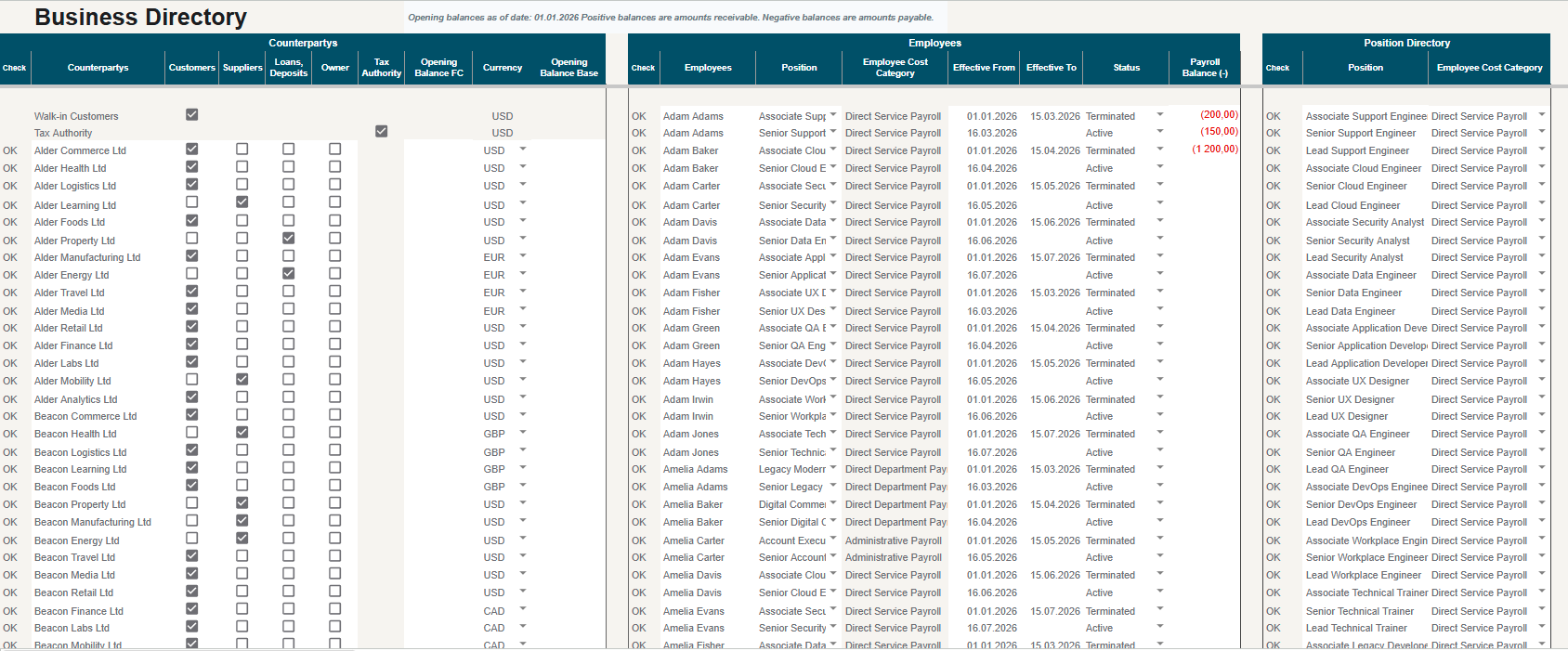 View full size View full size | Define once. Use across your records. Keep shared reference data consistent across daily entries and reports. |
Catalog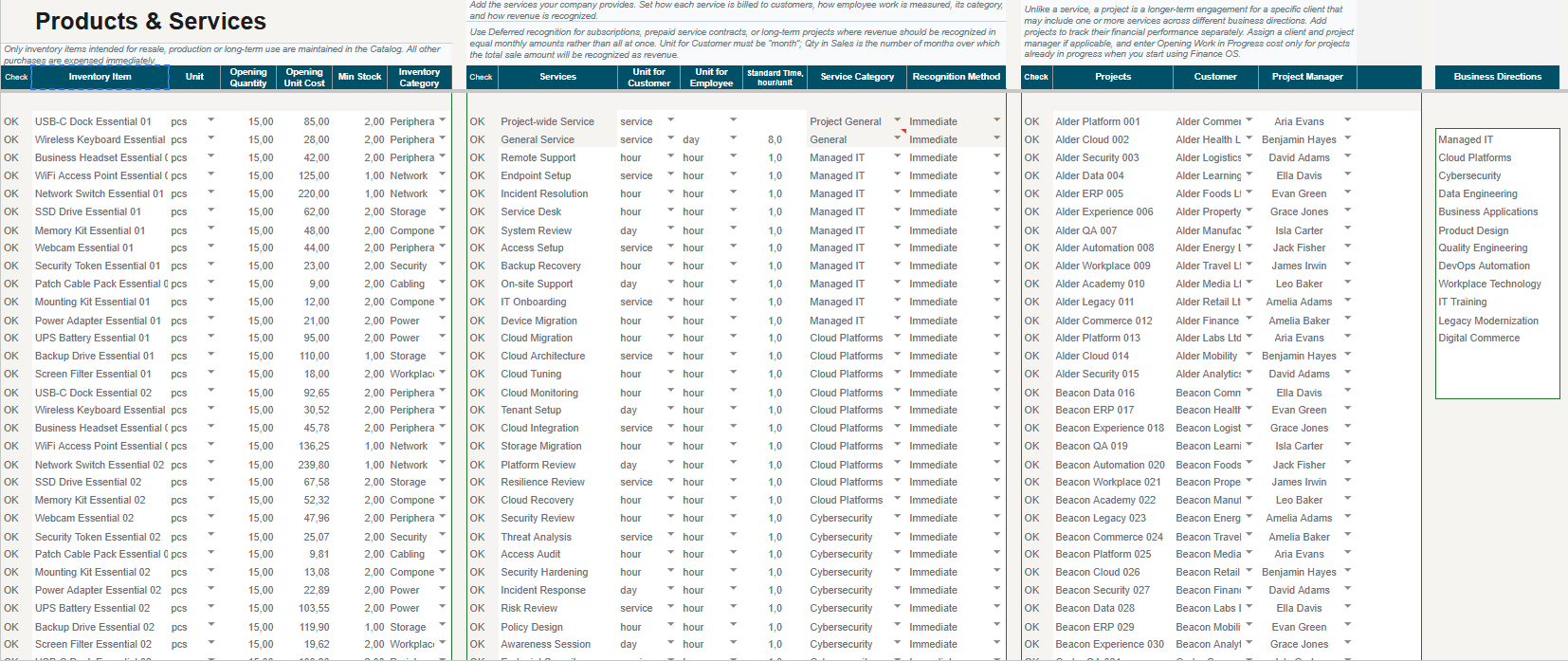 View full size View full size | Give every service a clear place. Organise the services and items used in your operational records. |
FinMap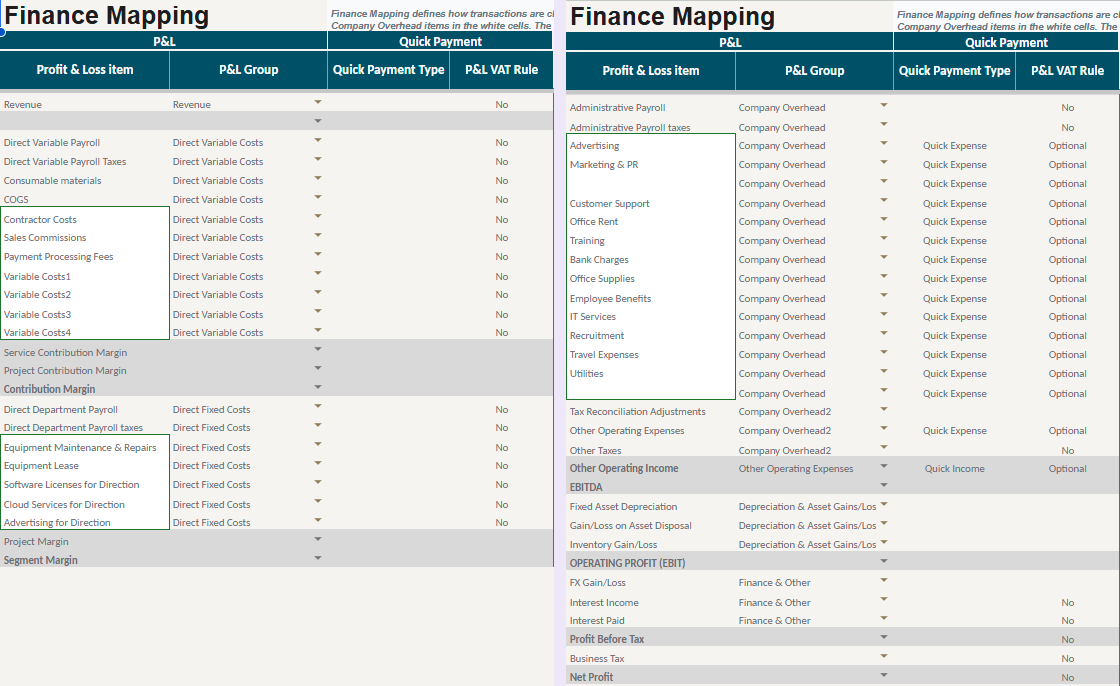 View full size View full size | Connect your financial categories. Review how financial categories link transactions to reports. |
| User Guide | Get started with clear instructions. Follow the guide to set up your workbook and handle everyday tasks. |
| Sheet / section | What it helps you do |
|---|---|
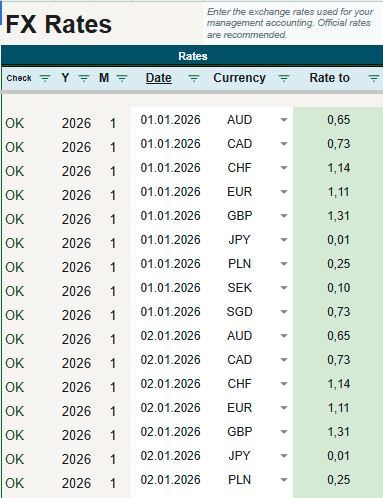
| FX | Different currencies. One financial view. Bring foreign-currency transactions into a consistent reporting currency. |
Sales & Delivery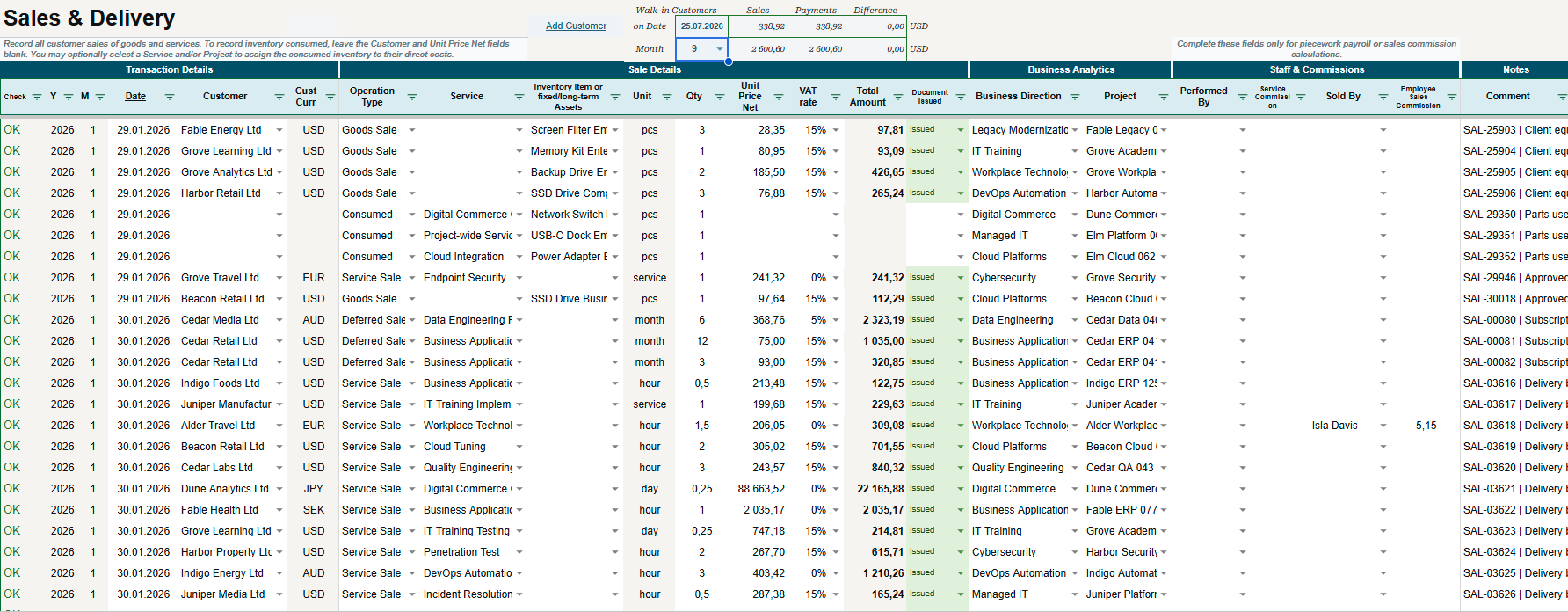 View full size View full size | Connect every sale to its result. Record sales and link them to the services, projects and teams behind them. |
Payments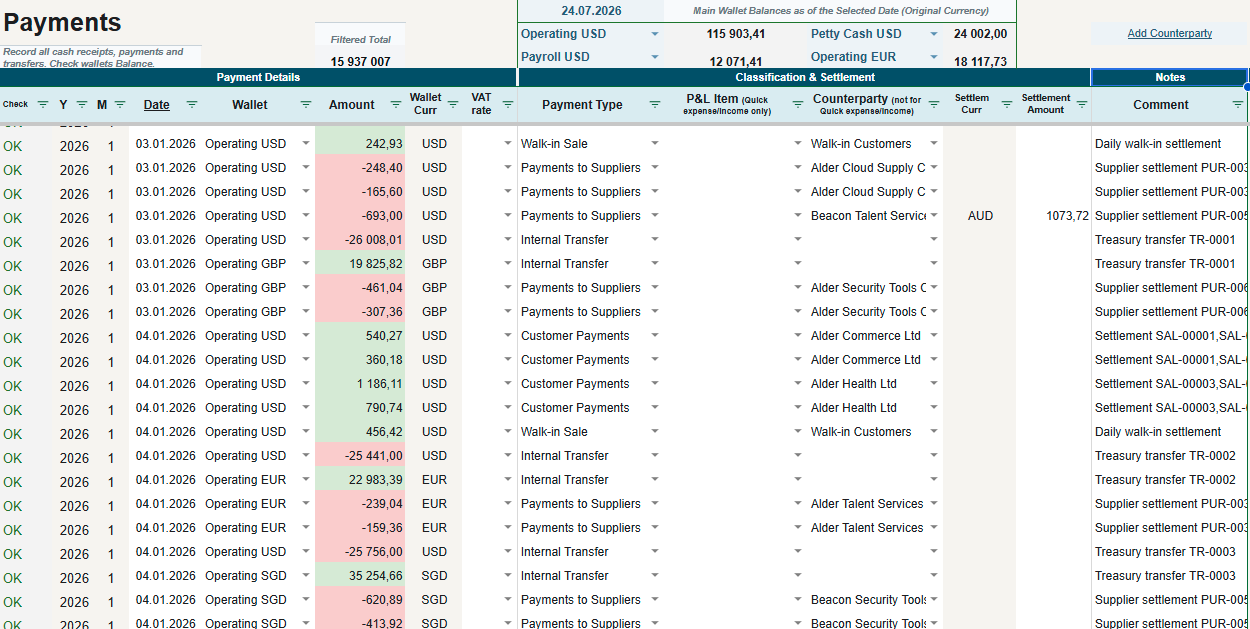 View full size View full size | Know where your cash goes. Keep receipts, payments and transfers connected to your cash reporting. |
Purchases & Accruals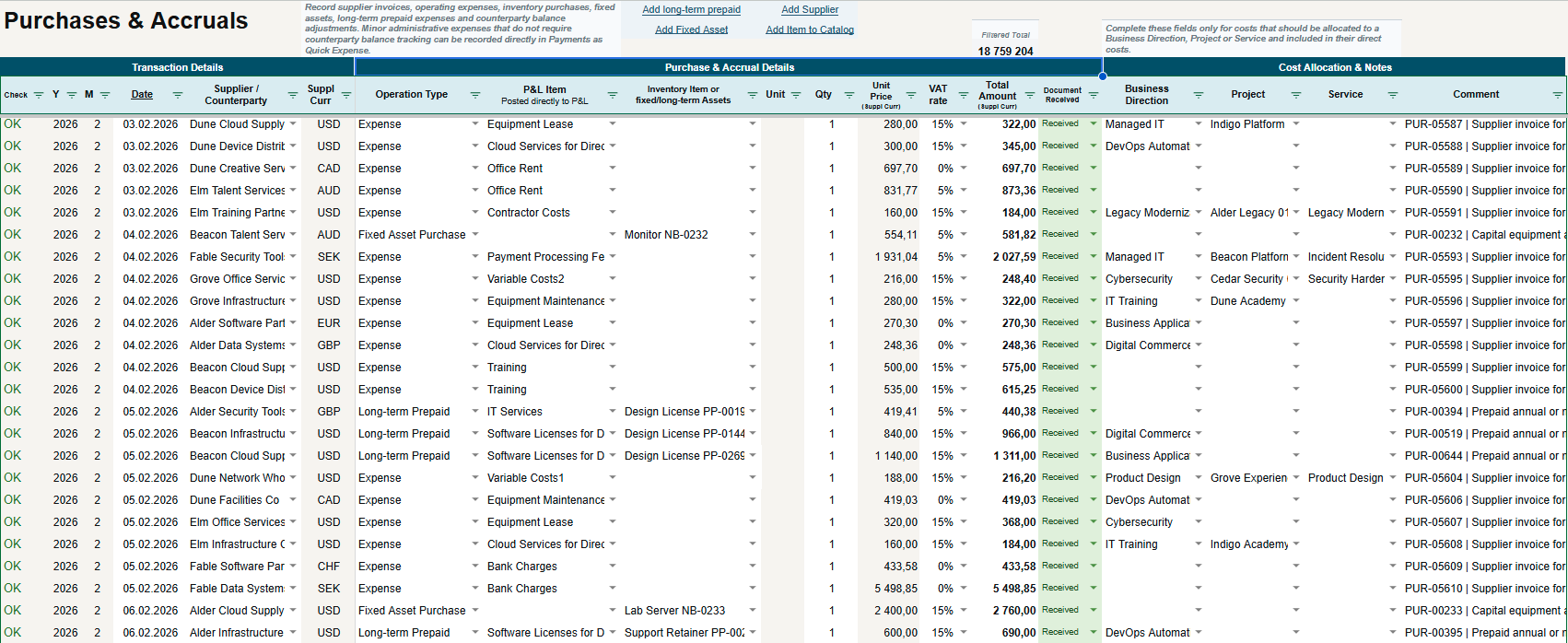 View full size View full size | See costs where they belong. Connect supplier costs and accruals to the activity that generated them. |
Employee Work Log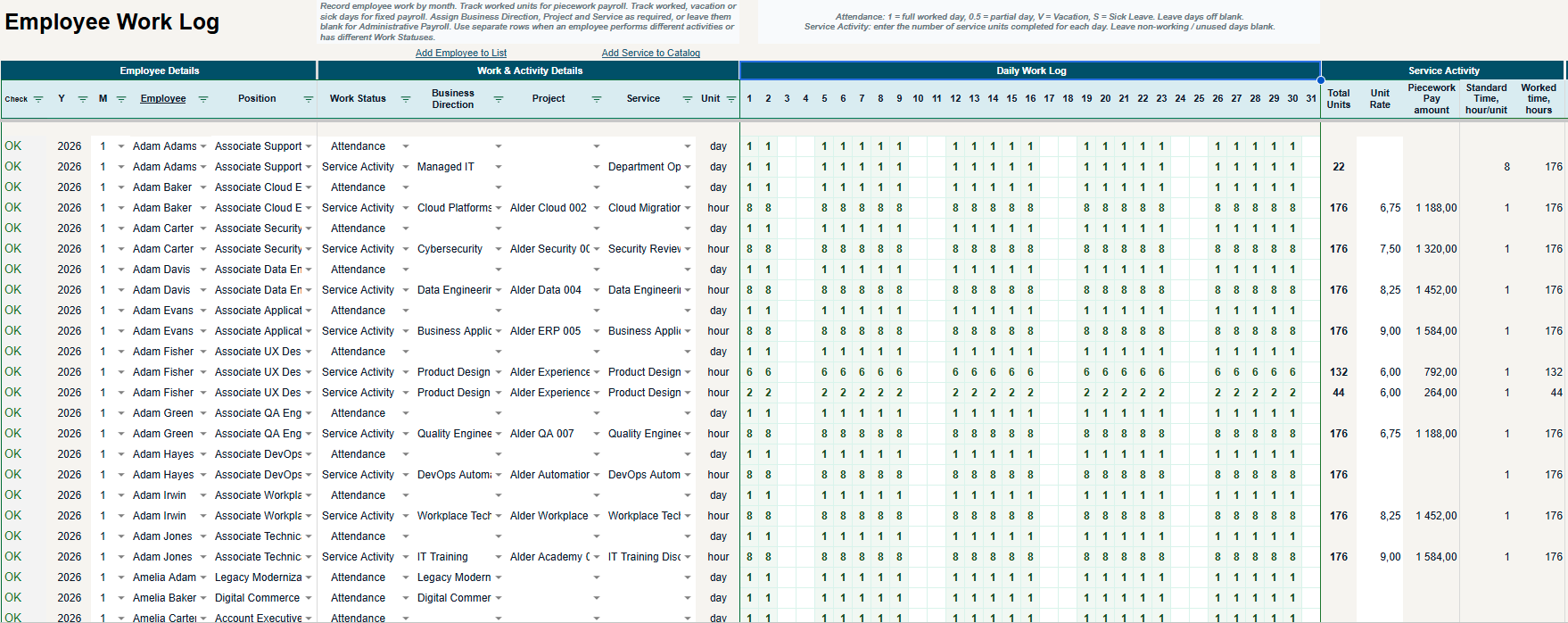 View full size View full size | Turn recorded work into useful insight. Connect attendance and service activity with payroll and team analysis. |
Payroll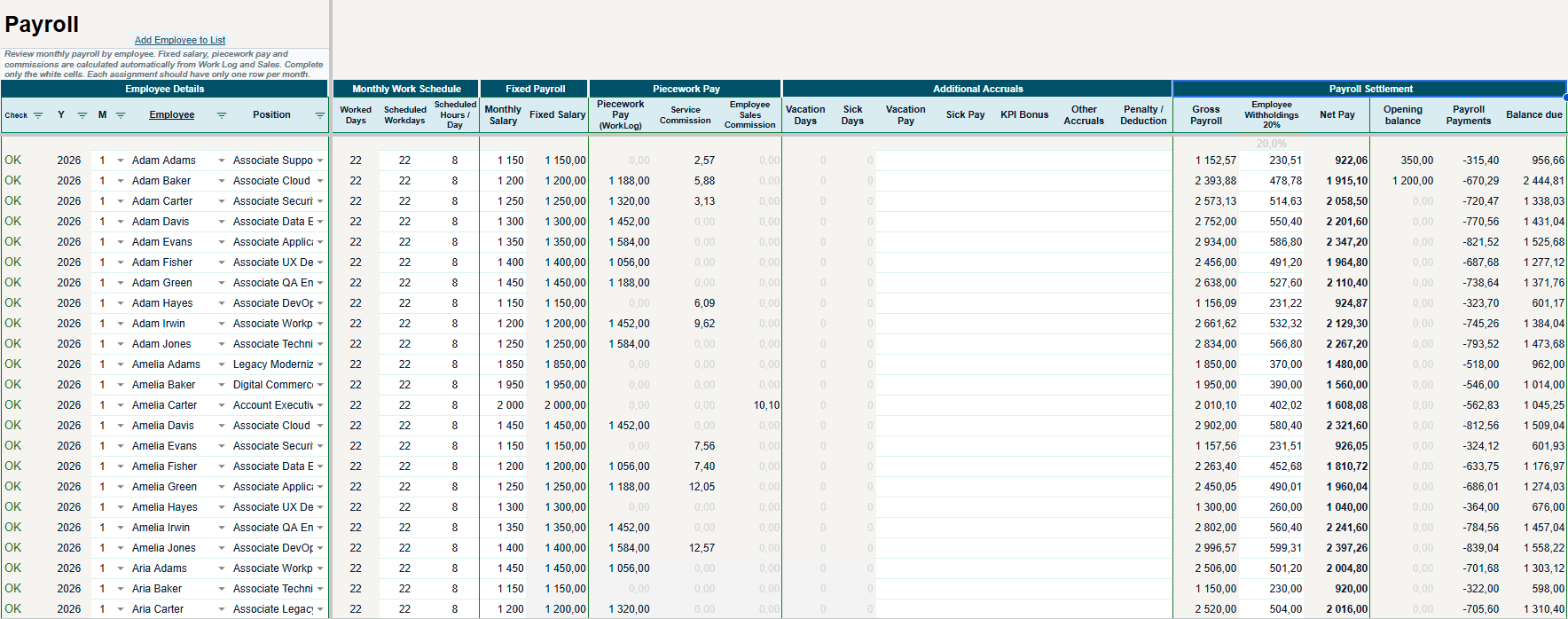 View full size View full size | Bring payroll inputs together. Combine salary, work-based pay and commissions with fewer repeated entries. |
| Asset — Fixed Assets & Prepaid | Spread costs across the right periods. Track fixed assets and long-term prepayments through their useful periods. |
| Deferred Revenue | Recognise revenue as it is earned. Distribute deferred revenue across the periods in which services are provided. |
Inventory Adjustments / InvAdj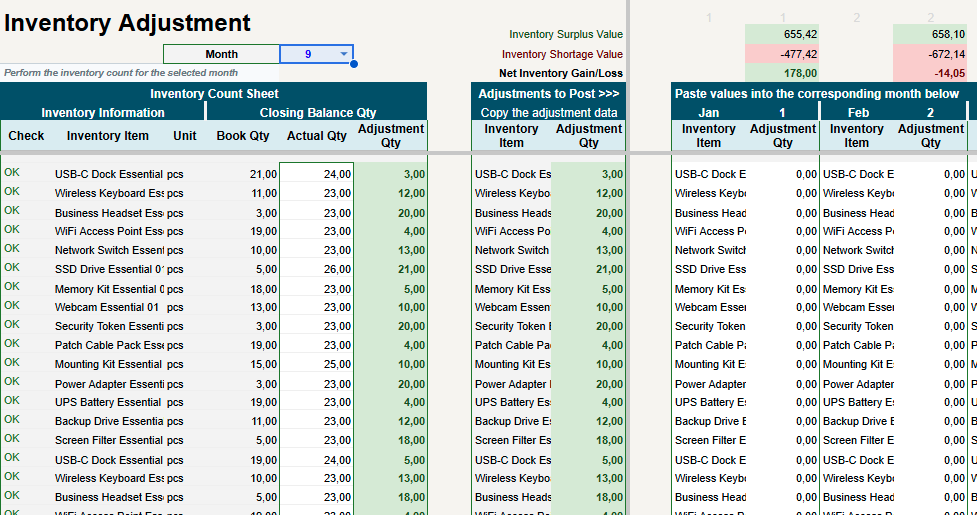 View full size View full size | Keep stock records aligned. Record inventory adjustments so stock reporting reflects documented changes. |
| Tax | Keep tax obligations in view. Track configured tax calculations and balances alongside your management accounts. |
| Sheet / section | What it helps you do |
|---|---|
Settlements & Balances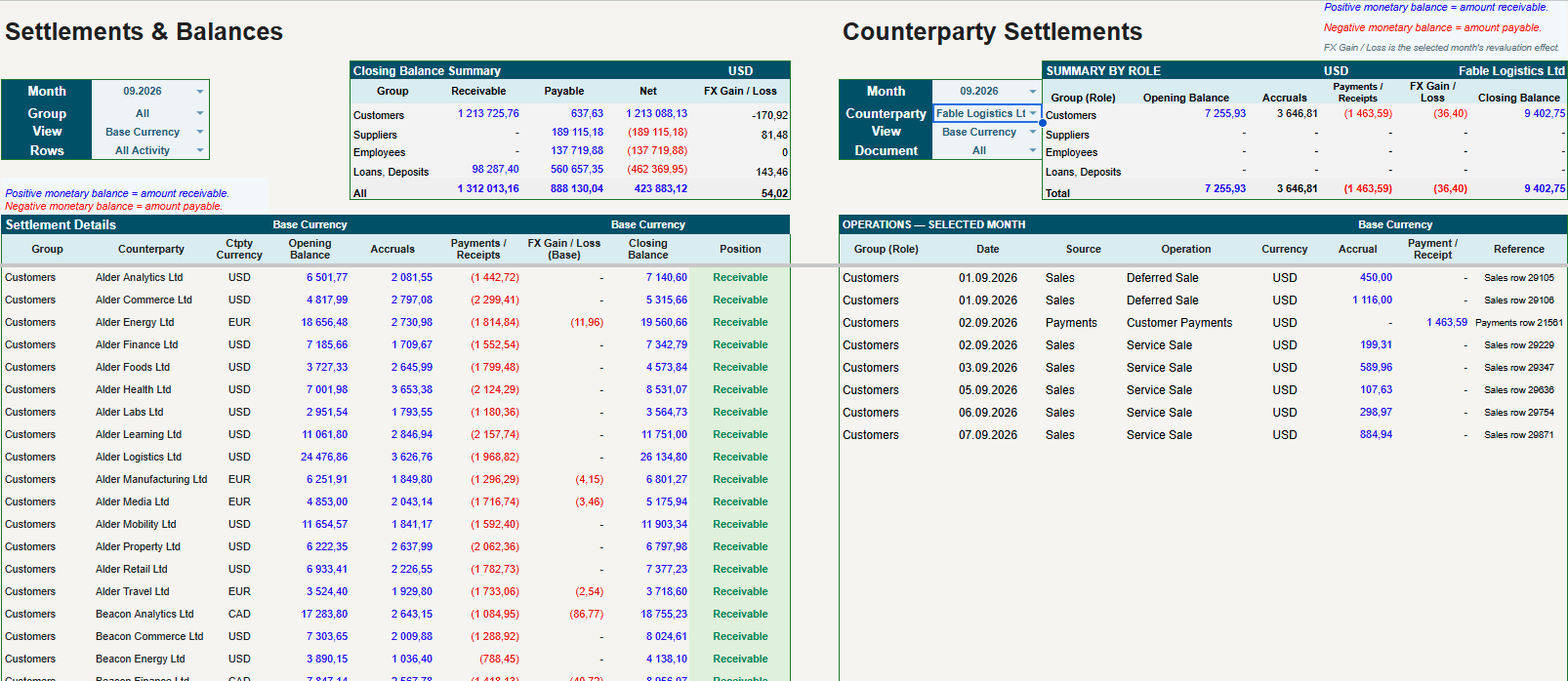 View full size View full size | Know who owes what. Review customer, supplier and other counterparty balances with their supporting movements. |
| Action Center | Know what needs your attention. Review priority issues and month-end checks before closing a period. |
Audit & Control Center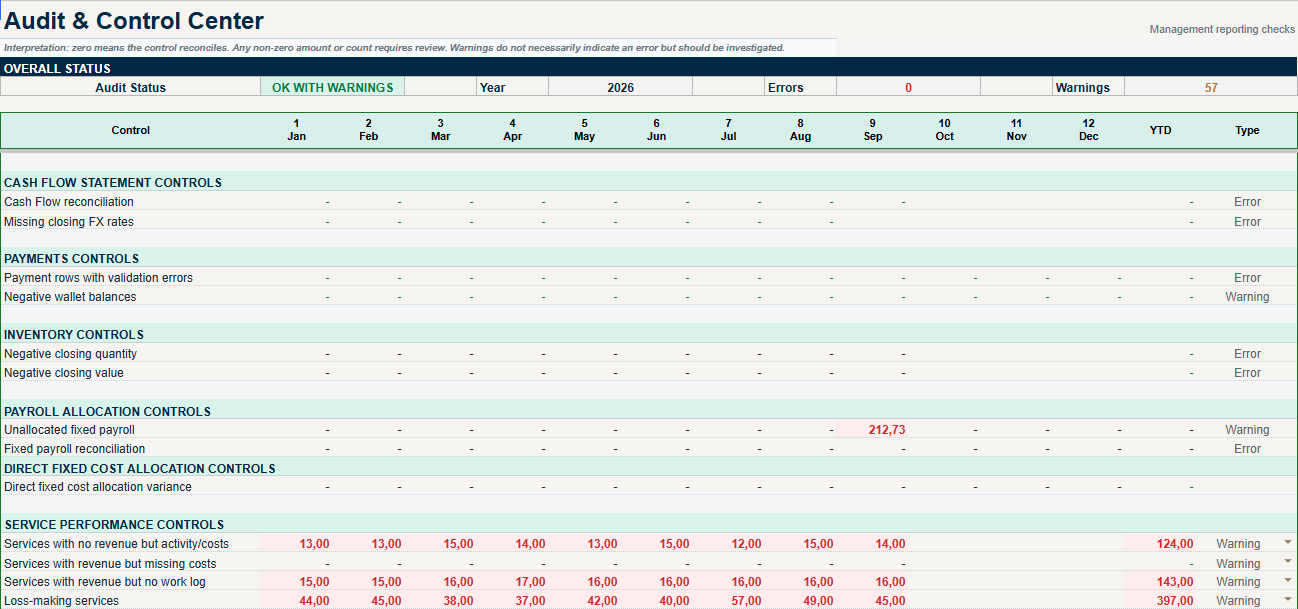 View full size View full size | Checks that point you to the issue. Review errors and warnings with the controls and areas they relate to. |
| Sheet / section | What it helps you do |
|---|---|
Owner Dashboard Navigator View full size View full size | Start with your business question. Find the reports that answer your questions about profit, cash and performance. |
| Owner Overview | Understand the business at a glance. Bring key results, cash positions and areas for attention into one owner view. |
Cash & Obligations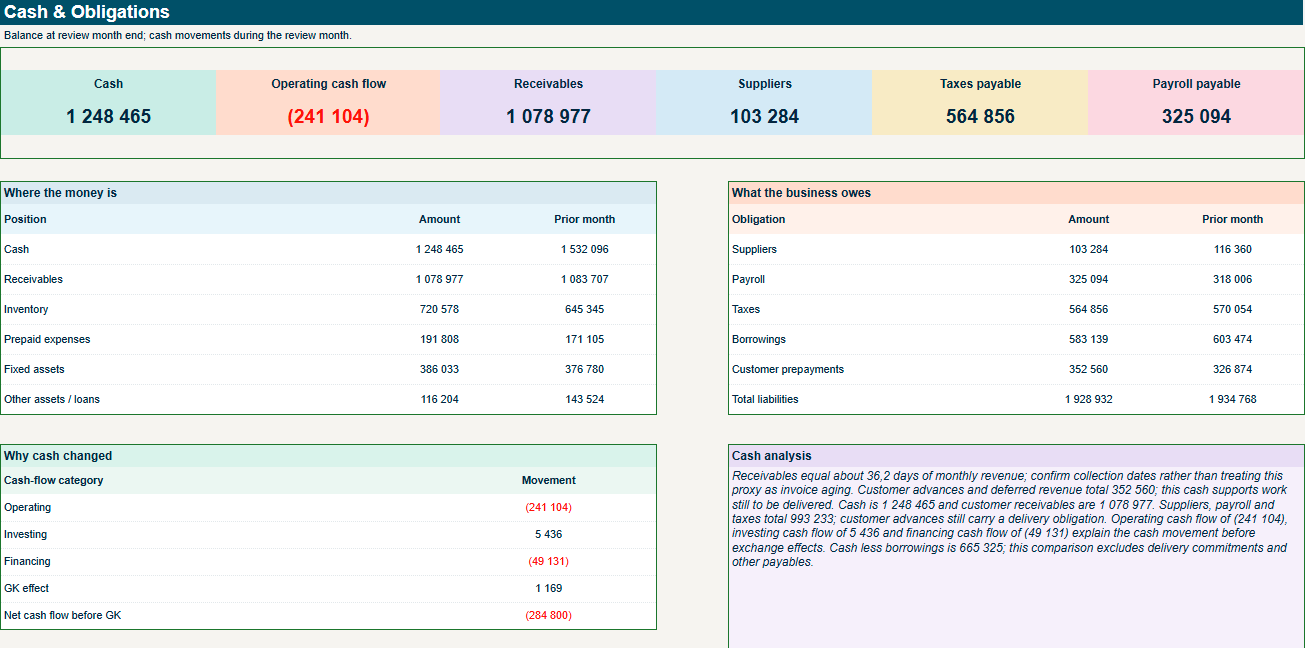 View full size View full size | Cash in the bank is only part of the picture. See available cash alongside customer balances and the obligations still to meet. |
Profitability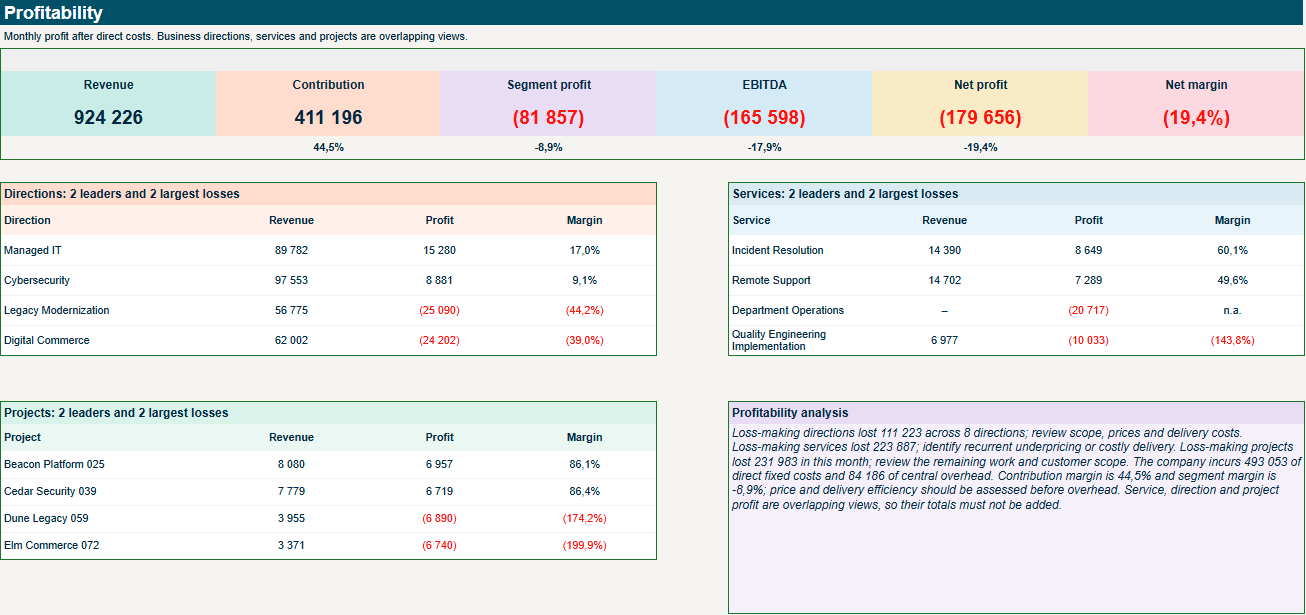 View full size View full size | See what drives profit. Compare the activities that contribute to profit and those that need a closer look. |
Efficiency & Returns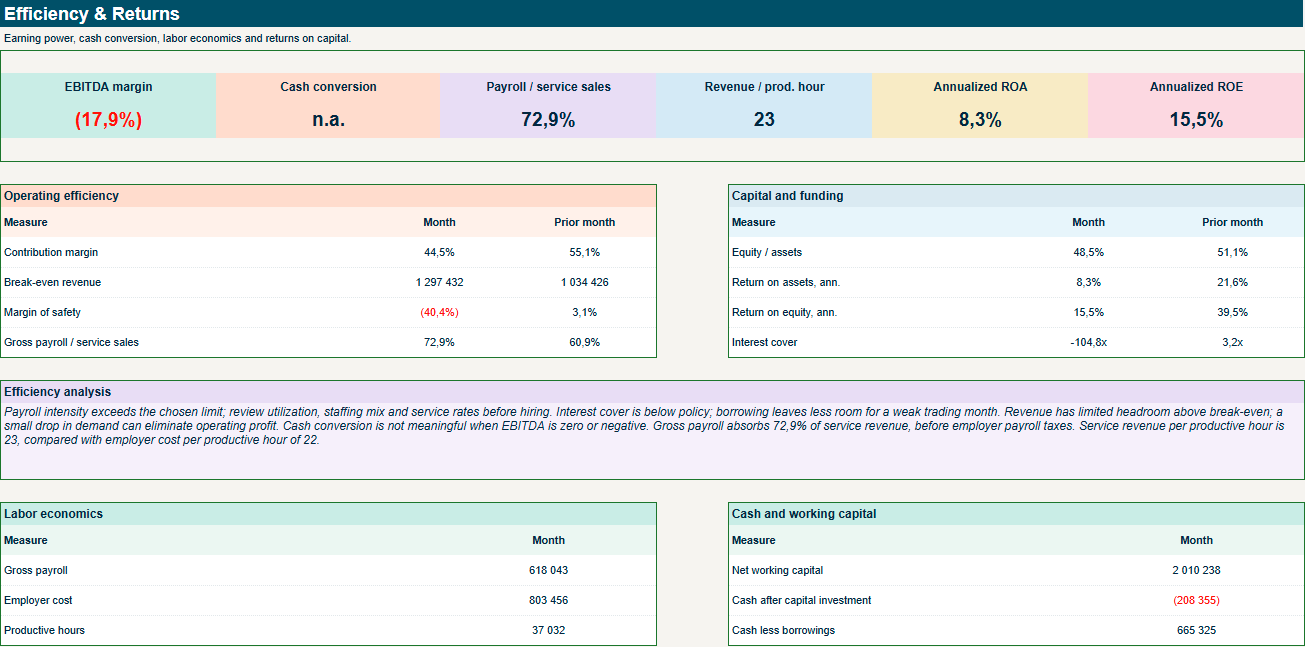 View full size View full size | Understand the return on your resources. Review margins, labour economics and capital returns in their business context. |
| Owner Withdrawals | Plan withdrawals with the business in mind. Review cash and business commitments before deciding on owner withdrawals. |
| Sheet / section | What it helps you do |
|---|---|
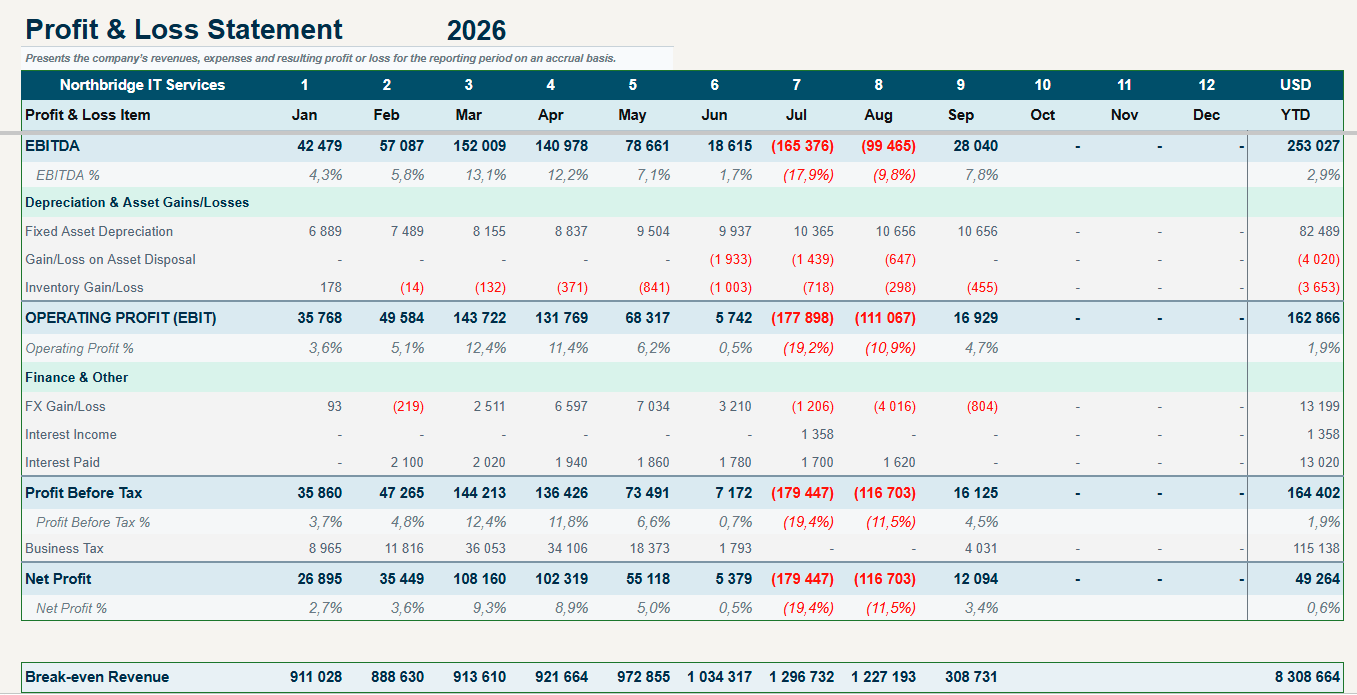
Profit & Loss / PL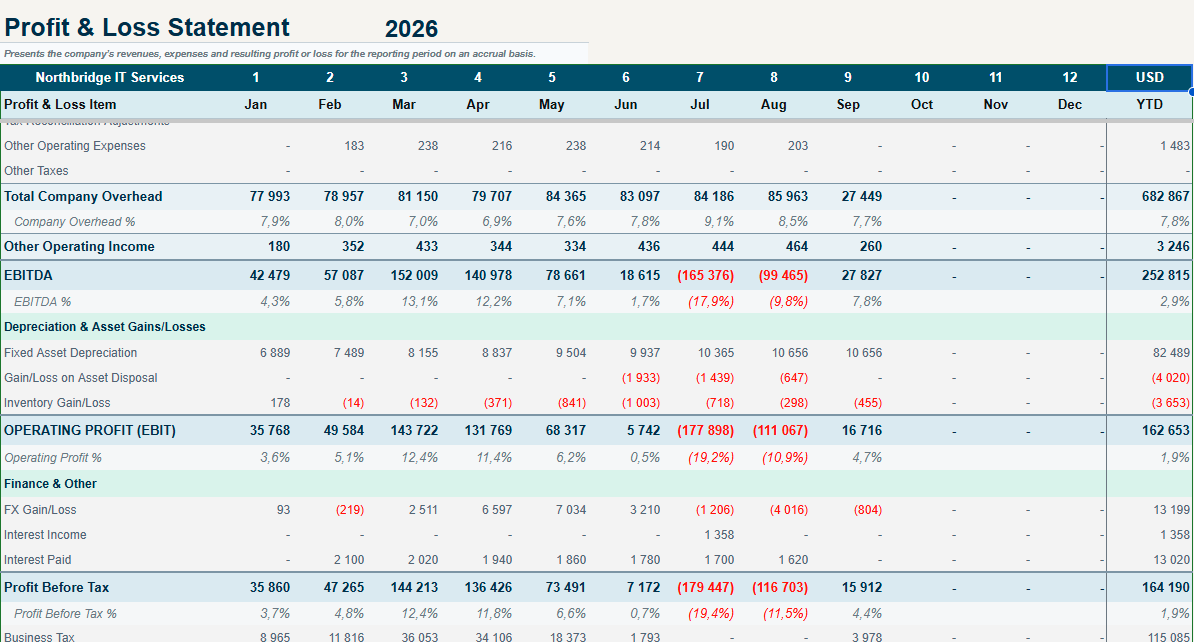 View full size View full size | Follow the path from revenue to profit. See revenue, costs and profit together to understand what shapes the result. |
Cash Flow Statement / CF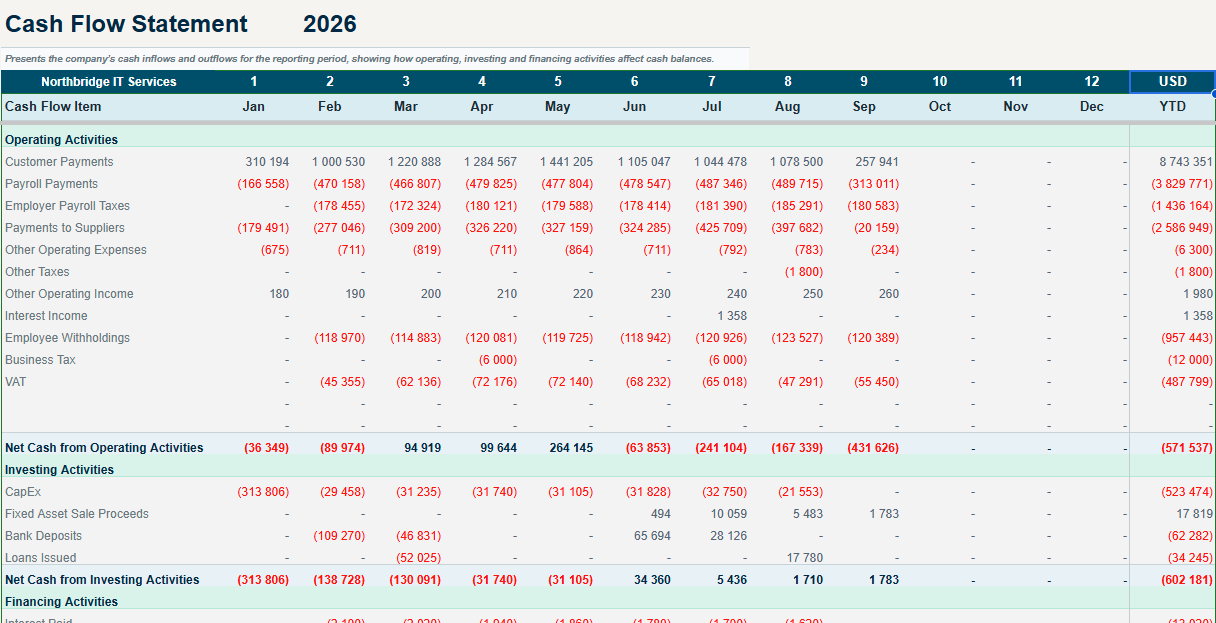 View full size View full size | Explain every change in cash. Separate operating, investing and financing movements to understand your cash position. |
Balance Sheet / Balance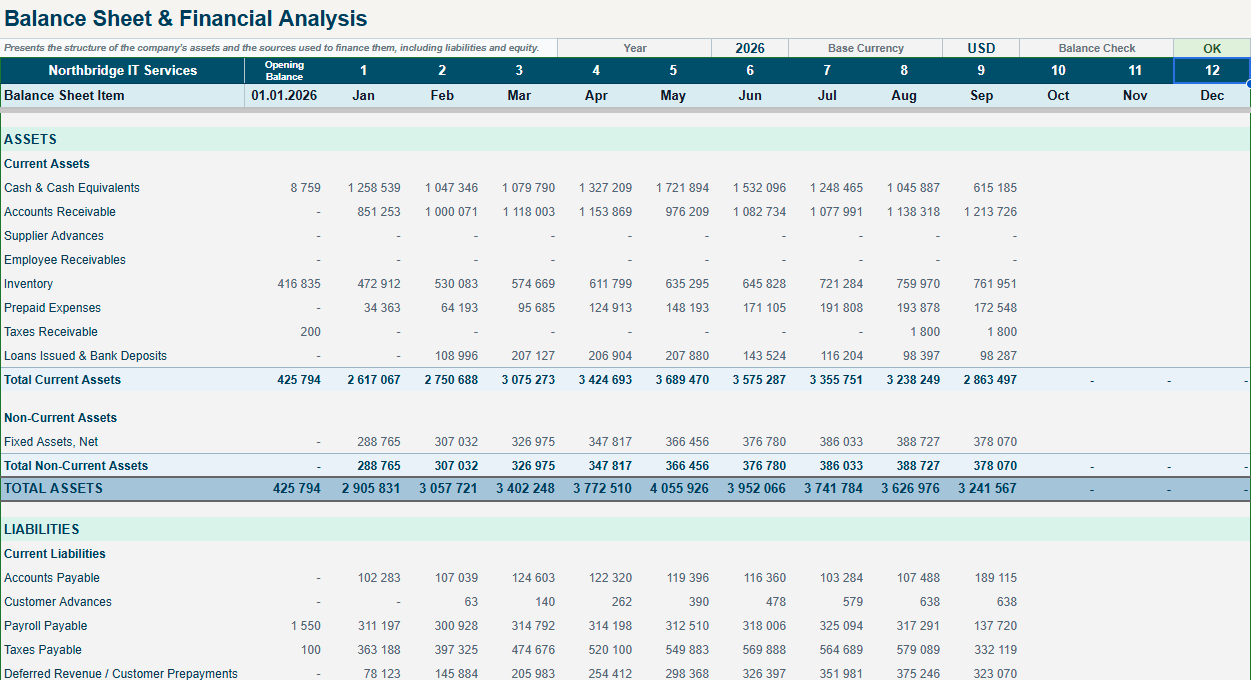 View full size View full size | See what your business owns and owes. Review assets, liabilities and equity together, with a built-in balance check. |
Financial Analysis / Analysis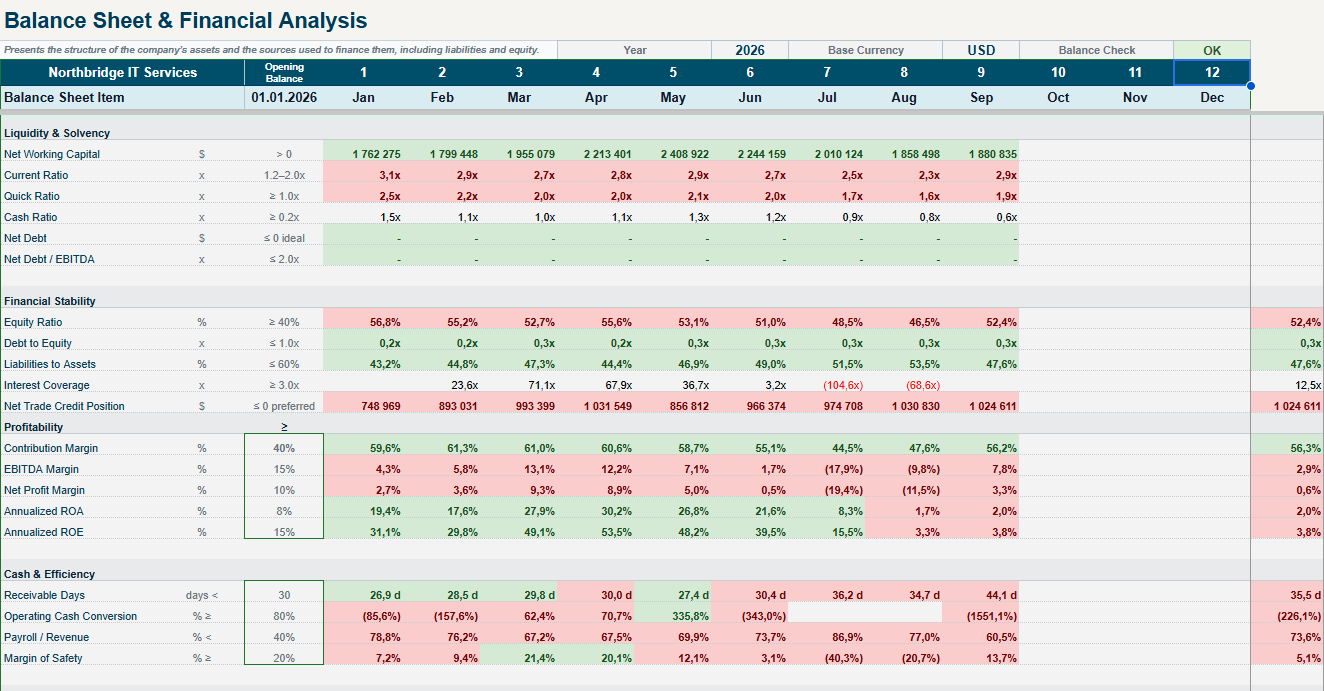 View full size View full size | Understand your financial health. Assess liquidity, financial stability, profitability and cash efficiency. |
Financial Trends / Trends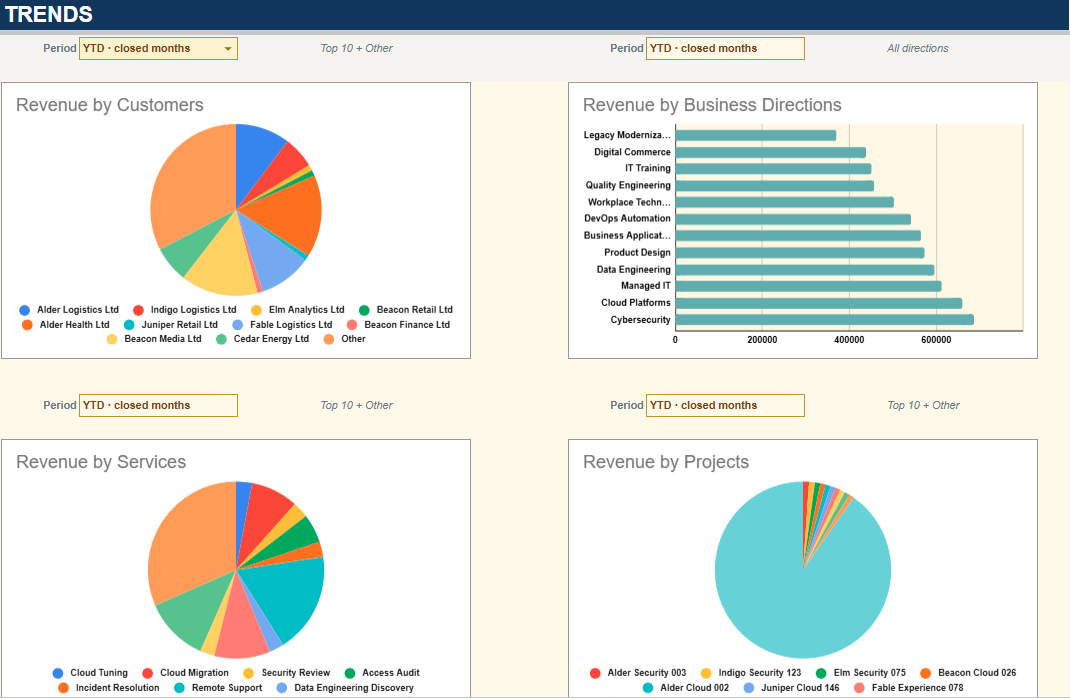 View full size View full size | See the direction behind the numbers. Follow changes in sales, costs, profit and cash across reporting periods. |
Service Performance / Service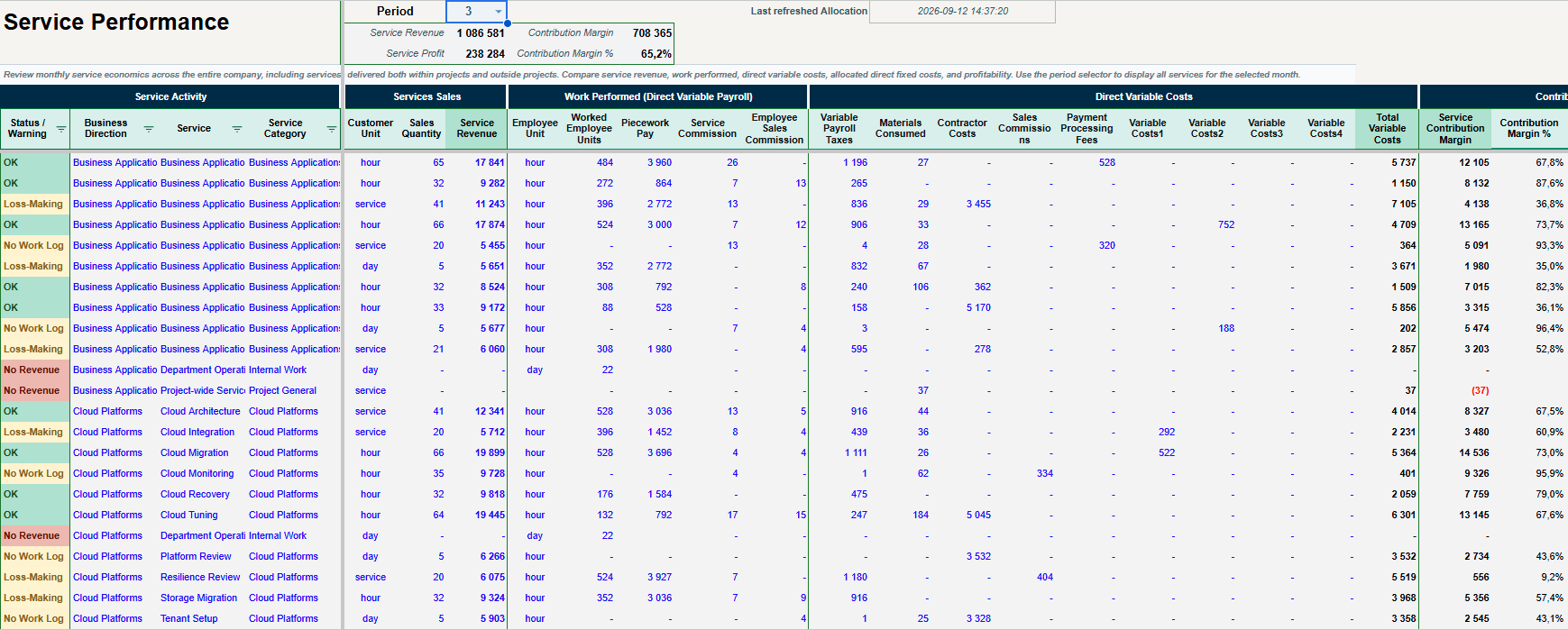 View full size View full size | Know which services earn their place. Understand service profitability after the costs assigned to each service. |
Project Performance / Project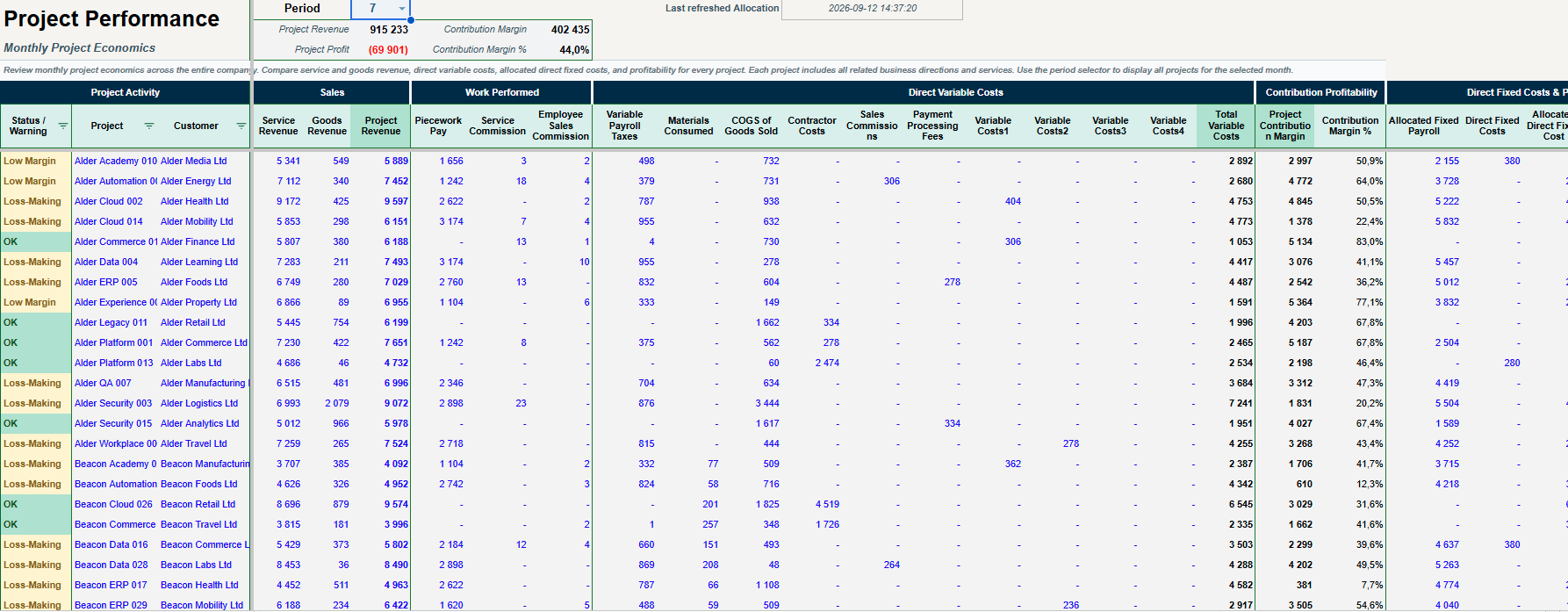 View full size View full size | See the result behind every project. Compare project revenue and assigned costs to identify profitable and loss-making work. |
Direction Performance / Direction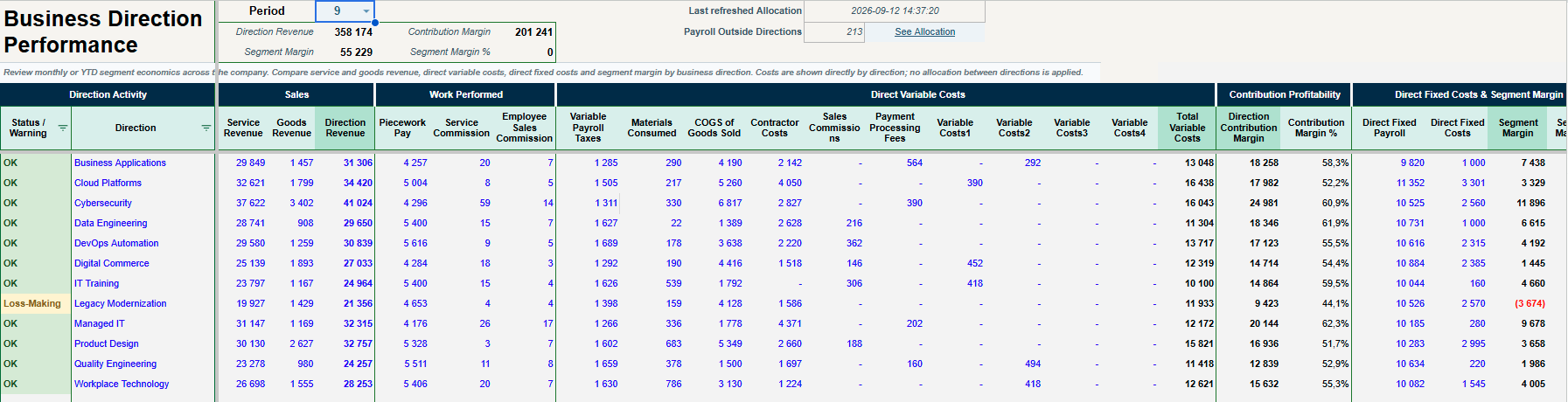 View full size View full size | Compare your business directions clearly. Review how each business direction contributes to the overall result. |
Team Performance / Staff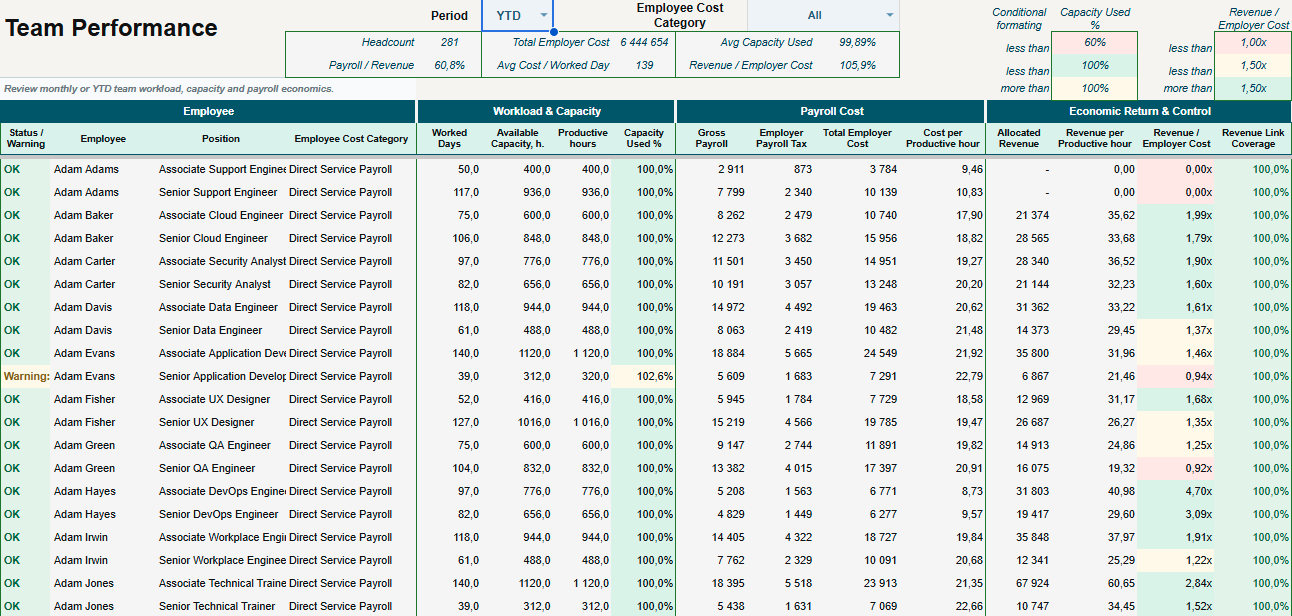 View full size View full size | Understand the economics of your team. Connect workload, employee costs and revenue to explore team performance. |
Inventory Analysis / Stock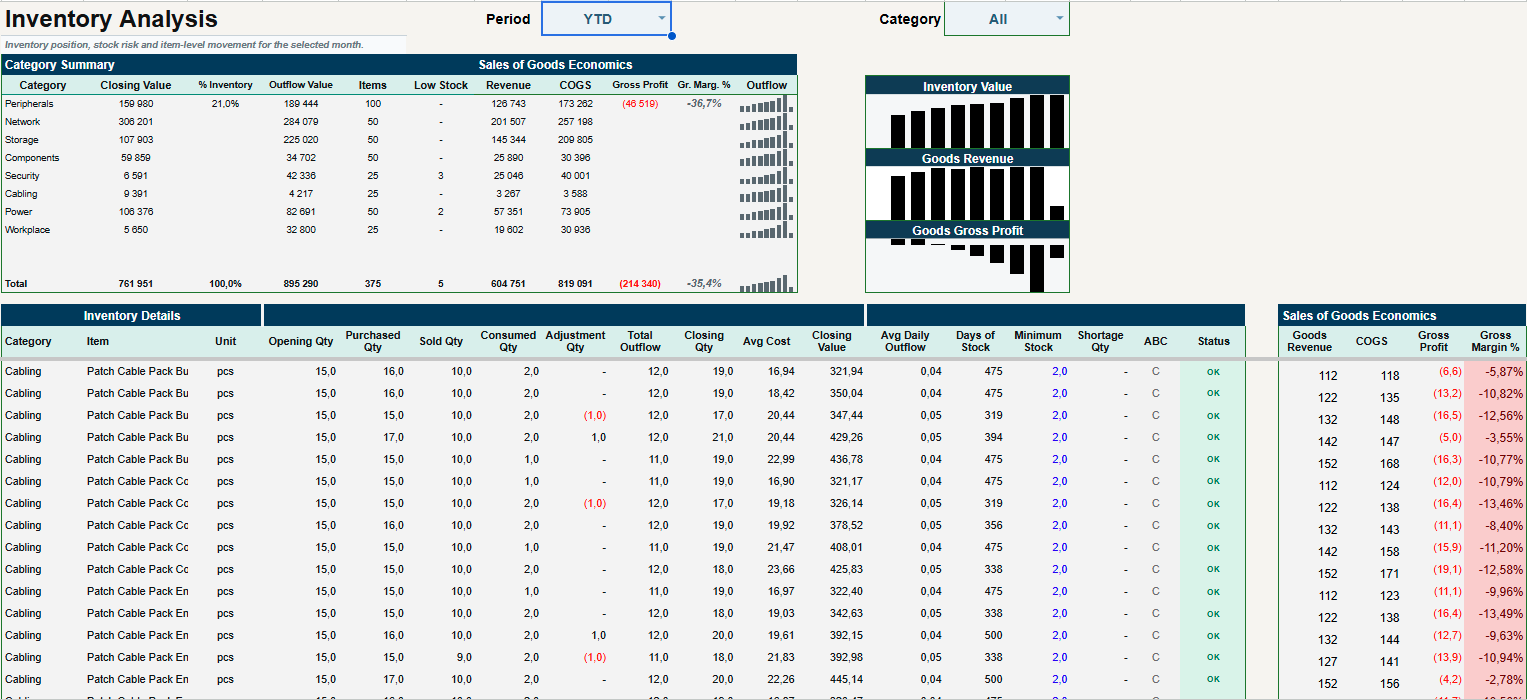 View full size View full size | See the money tied up in stock. Review inventory value, stock risks and the economics of goods sold. |
| Cash Forecast / CForecast | Spot cash gaps early. Use automatically prepared and refreshed forecasts to review upcoming cash needs. |
| CFO Analysis / CFO | Turn financial detail into a clearer next step. Explore connected financial signals, explanations and areas that deserve investigation. |
A clear path from your first setup to everyday records, useful insights and the next reporting period.
Make your own copy in Google Sheets and set the year, currency and business preferences. This gives your team a workspace built around the way your company operates.
Add your customers, suppliers, employees, services and opening balances. Your lists and starting figures then carry through to daily entries and reports.
Choose which input areas each team member can edit. Everyone works in one shared workbook, while the owner keeps control of calculations and access.
Record payroll, purchases, payments and sales in structured sheets with helpful dropdowns. Each team member updates their assigned areas, and the records come together in one programme.
Record attendance and service activity in WorkLog, with sales feeding the relevant commissions. Payroll brings these inputs together, and payments track what has been paid.
Built-in checks flag missing information, inconsistencies and results that deserve a closer look. Use Audit and Action Center to review issues and trace them back to the records.
Review profit, cash flow, balances and business performance in connected reports. Add planning inputs and refresh Cash Forecast to see when cash may need attention.
Run the month-close checks and lock the period’s input rows once it is ready. At year-end, create a new annual workbook with your settings, reference lists and closing balances carried forward.
From daily entries to year-end, checks, controlled access and recovery options help keep your records consistent and protected.
Dropdowns, reference lists and date rules help users enter consistent, correctly formatted data.
Each entry is checked for valid values, required fields and consistency between related data.
Cross-checks between financial reports and underlying records help identify discrepancies and trace their source.
Reports are checked for errors and financial inconsistencies. Warnings flag unusual results that need review.
Errors, warnings and reconciliation results are brought together in one place, so you can see what needs attention.
Technical sheets, formulas and calculation areas are protected from user edits. The workbook owner retains full control.
The owner can restrict each user to editing the input areas assigned to their responsibilities.
An automated procedure checks that the month is ready to close, then locks its input rows to preserve the period’s records.
Transfer closing balances, settings and reference lists into next year’s workbook automatically. Keep your records connected across years and reduce the risk of transfer errors or omissions.
Keep the main workbook restricted while employees work in separate input registers. This tailored setup is available on request as an additional paid service.
Choose which employees can access the workbook. Review permissions and restrict or revoke access whenever needed.
Use Google Sheets version history to review edits and the accounts behind them. Create backup copies and restore an earlier version when needed.
Multiple team members can work in the same workbook from wherever they have access to Google Sheets and an internet connection.
Configure editing permissions around each person’s responsibilities, so they can update their assigned input areas.
Editing permissions do not create separate confidential views of the workbook. The owner controls protections and access.
Automatic calculations, built-in checks and practical menu commands keep your records moving with less repeated work.
Prepare and update Cash Forecast using recorded data and planning inputs. See projected balances and periods that may need funding.
Populate employee and position data to reduce repeated entry and prepare the working records for your team.
Run the automatic month-close procedure to protect input cells for closed months and help prevent accidental changes.
Create your next annual workbook for free. Automatically transfer all settings, reference lists and closing balances into the new year.
Formulas and reports update automatically from your entries. Smart Finance also checks that the Balance Sheet balances and flags discrepancies for review.
Smart Finance automatically identifies accounting inconsistencies and warning signs in business performance. It explains what needs attention and helps you focus on the issues that matter.
Start with the programme. Add personal guidance if you would like a hand.
One-time purchase
A connected financial management system in Google Sheets.
3 hours · use within one month of payment
Get support with your initial setup and first steps.
12 hours · use within one month of payment
Work through your setup and first reporting cycle with guidance.
All prices are in USD and include applicable taxes. One company per activation code; free annual workbook rollover and add-on updates with an valid activation code. Terms of use · Consultation terms
Need a tailored solution? Individual configuration and customisation are available by agreement. Scope and pricing are agreed before work begins. Email support@accuroo.app for a quote.
Still wondering if Smart Finance is right for your business?
Ask a questionAccuroo is our digital-products brand. Accuroo Smart Finance is a financial operating system (ERP OS) built on Google Sheets for small and medium-sized service businesses. It combines management accounting, financial analysis and decision support for business owners, connecting day-to-day activity with financial statements, owner-focused reports and practical explanations.
No. Accuroo Smart Finance is currently $99 once, including applicable taxes, for one company. You can keep using the supplied version. Add-on updates are free with an valid activation code. Personal setup assistance and consulting are purchased separately; software bug reporting and correction are included.
No. Each workbook covers one calendar year. Create the next annual workbook at no additional charge, then automatically transfer your settings, reference lists and closing balances as the new year’s opening balances. Updates to the Accuroo script add-on are also free with an valid activation code.
Not for routine data entry. Team members without a background in finance or accounting need to read the guide included in the programme before they begin. The workflows are straightforward and intuitive, and personal assistance is available for an additional fee.
Yes. Multiple people can work in the shared Google Sheets workbook. Editing permissions can be configured for assigned input areas. These permissions control editing; they do not create confidential views of separate parts of the workbook. The owner controls access and protections.
Technical sheets and calculation areas are protected from editing by users without permission. Daily work takes place in designated input areas. Closing a month protects input cells for that period to help prevent accidental changes.
The programme is intended for businesses recording up to 250–300 employees over the year, depending on employment duration and payroll assignments; up to 500 external counterparties with individual balance tracking, plus unlimited one-off counterparties without balance tracking (within transaction limits); and up to 2,500 payment transactions per month. Employee capacity is not a count of simultaneous users.
Yes. Smart Finance’s built-in analysis and commentary highlight changes, inconsistencies and areas for attention. These explanations form part of the programme’s financial logic.
AI chat assistance can be explored through a separate compatible add-on. Contact us to discuss the supported setup. The add-on is separate from Accuroo; availability, charges and data handling depend on its provider.
The planned purchase flow uses Paddle to automatically deliver a PDF containing a link to create your workbook copy, instructions and an activation code. Install the Accuroo add-on from Google Workspace Marketplace and activate it using that code. Checkout and the Marketplace release are being prepared; contact us for availability.
One activation code covers one company and its authorised team and advisers. Internal backups and annual rollover copies are allowed. Resale and sharing the programme with unrelated businesses are not permitted. Separate client companies need separate purchases and activation codes.
Reporting and correcting software bugs is included. Setup, training, consulting and individual assistance are separate paid services. Add-on updates are free with an valid activation code.
We do not offer voluntary change-of-mind refunds for the programme once digital access is supplied. Applicable mandatory rights and the Paddle rules for the purchase remain unaffected. Consulting packages have separate cancellation terms. Read the delivery and refund policy.
Smart Finance does not export your financial records to external services. If you authorise access for an adjustment or technical fix, your workbook is accessed only for that task; we do not keep workbook copies or use AI during support. The planned activation service will separately process your activation code and the identifiers needed to enable programme access. Optional third-party AI add-ons have their own data policies.
Setup Assistance provides 3 hours for $200; One-Month Support provides 12 hours for $600. Both prices include applicable taxes. Use either package within one month of payment. Calls, file work and correspondence count toward the hours; unused hours expire. You may request a full refund within that month if no paid work has begun. See the consultation terms.

years of experience
as a CFO
years running
my own business
“I create the financial management tools I wished I had as both a CFO and a Business Owner.”
I wanted to make practical financial management affordable and accessible. Smart Finance is designed to help you get management accounting up and running in your service business within a few days, independently and without needing to become a finance professional. Clear input areas, contextual guidance and multiple layers of checks help you enter data consistently, spot mistakes and understand what your numbers are telling you.
And if you would like advice, a hand with setup or support along the way, you can turn to me for personal assistance.
With more than 20 years of experience as a finance director and over 10 years running my own business, I have always valued timely, reliable information. Yet I repeatedly found that accounting software did not give me the management insight I needed: a clear view of business performance, an explanation of the results and a practical basis for decisions.
I create financial management tools that turn business data into a clear basis for decisions. Accuroo Smart Finance brings this approach to life, combining ease of use and flexibility with detailed calculations and carefully developed financial logic.
Accuroo Smart Finance took nearly six months to develop, with repeated testing and AI-assisted reviews throughout the process. It reflects more than two decades of practical experience and a belief that useful financial information should be understandable and actionable.
Understand the results. See what needs attention.
Choose your next step with a clearer financial picture.